
The Marketing Brain: an AI sales enablement playbook for the one place your GTM team actually uses
"Do we have a one-pager for that?" My sales team asked me that 15 times a day, about answers I'd already written down. So I built one place they could ask instead.

Let's get this out of the way: I'm not the first PMM to point AI at sales enablement, and I won't be the last.
You've probably seen five versions of this idea on LinkedIn this month. But the problem in front of me was mine to fix. So I built something for our specific mess: a Marketing Brain. One place anyone on our GTM team can go for verified resources on any GTM request, pulled from approved sources only, that says "I don't know" when it doesn't.
I didn't figure this out alone, either. Conversations on the pod, like this one with Michele Nieberding on turning AI into a sales enablement cheat code, helped me think through what this would look like with real reps and real deals (not just in a LinkedIn carousel).
This is the whole build. Your team, products and docs are different from mine. But if you're the PMM people ping before they ping anyone else, I'd bet the problem is the same. Take what works, skip what doesn't, and steal the rest.
Before the buildStart here
Start here · The definition
What is a Marketing Brain?
The short versionA Marketing Brain is a single place anyone on your GTM team can go to get verified resources for any GTM request: a deal question, a renewal, an RFP answer, the right deck, a first draft. It's one shared AI workspace that answers only from approved internal sources. One router, many narrow specialist skills, one shared rulebook. If no source supports an answer, it says so instead of guessing.
Start here · The engine
Do you need AI to build a Marketing Brain?
The short versionYes. AI is the engine. Without an AI platform, building one is close to impossible, unless you spend a shit ton of money on an enterprise enablement platform. Even then, you probably won't get the flexibility you can build yourself today.
Everything that makes it a brain instead of a folder is AI: understanding a messy question in plain language, picking the right source, drafting the first version, and admitting when it doesn't know. A wiki can't do that. A shared drive definitely can't.
An enterprise platform also locks you into someone else's idea of how enablement should work. On an AI platform with shared team Projects, you write your own rulebook, build exactly the skills your team needs, and change them the same day your positioning does.
How it works
Anyone on the GTM team (AEs, SDRs, CSMs, AMs, marketers, PMMs) asks a question or requests a draft in plain language. The Marketing Brain turns the request into a precise question about your products, customers or GTM motions (even when the rep doesn't name the company), sends it to the right specialist skill, answers from approved sources in a fixed order, runs it past the guardrails, and returns either a short verified answer or a draft labeled for review.
It runs on any AI platform with a shared team Project feature. I built mine in Perplexity. Nothing in this playbook depends on that.
The philosophy: AI does the repetitive 80% (finding the deck, answering "can we do X?", the first draft of the email, the RFP answer, the meeting brief). People own the last 20%: judgment calls, positioning, approvals, and the feedback loop with the field.
Start here · The mindset
How should a PMM think about building a Marketing Brain?
The short versionBuild it like you're launching a new product. Your GTM team is the customer. Same steps you'd run for any launch: business case, scope a v1, build, test, fix, wider release, keep improving, then measure it and plan what's next.
You already know how to do this. You do it every time you launch something. The only difference is who the customer is: your AEs, SDRs, CSMs and AMs.
That framing changes how you build it. You don't ship a v1 to the whole market on day one, so don't ship it to the whole sales floor either. You don't skip the business case, so don't open an AI tool before you can say what problem it solves. And you never stop iterating after launch, so neither does the Marketing Brain.
| Launch step | What it looks like here | Where it lives |
|---|---|---|
| Business case | The one-line problem and the questions reps ask most | 01 · Diagnose it |
| Scope v1 | The sources, question families and first skills you'll start with | 02 · Stock it |
| Build | The rulebook, skills and connectors | 03 · Build it |
| Test, fix, wider release | Early-adopter reps, a few weeks of fixes, then office hours for everyone | 04 · Ship it |
| Iterate | Field feedback, the unknown log, refreshes and owners | 05 · Keep it alive |
| Measure and advance | Impact against company and department goals, plus a living roadmap | 06 · Watch the film |
The launch model I borrowed is rolling thunder (more on that in Ship it). April Dunford broke down exactly how to run one on the pod.
// Run it back
Your Next Product Launch Could Use a Little Rolling Thunder
with April Dunford · 30 min
Phase oneDiagnose it
Diagnose · The real problem
Why don't reps use your enablement content?
The short versionBecause they can't get to it fast enough to trust it in the moment. The problem is almost never the information. It's access to the information.
Reps were losing real selling time hunting down basic information they needed to move a deal. One customer question ("can you cover this?" or "how do you calculate that?") turned into five Slack messages to five people. Product for the capability. Ops for the details. Sales leadership for the process. PMM for the deck. Someone in CS who "handled this last quarter."
The rep waits. The deal waits. And the PMM turns into a human search bar instead of the point guard who sets the team up to score.
My first fix was the obvious one: write it all down. I spent months documenting methodology, what we actually had available, and how the sales process worked. Good docs, too (if I do say so myself).
They sat in Drive. Nobody opened them. Reps kept asking, "Do we have this?"
Reps don't want a folder. They want an answer, in the moment, in plain language, that they trust enough to say out loud to a customer.
Michele Nieberding calls this the enablement black hole: reps panic-Slack the PMM for competitor differentiators that are already documented somewhere. Her fix is the same move this playbook makes: go from static enablement to dynamic, self-serve resources reps can query mid-deal.
// Run it back
From Static to Dynamic: How to Turn AI Into Your Sales Enablement Cheat Code
with Michele Nieberding · 24 min
Diagnose · Where to start
Where should you start building a Marketing Brain?
The short versionStart with the business problem, not the AI. If you can't write yours in one sentence, you're not ready to build.
Mine was: "Reps lose time and deals stall waiting on answers." Every design decision in this playbook traces back to that sentence.
Then count the pings. Pull a month of questions from Slack, call notes and your own DMs. Group them into families:
- Product truth: "Do we have X?" "How do we measure Y?"
- Customer conversations: objections, "why us?", tough follow-ups
- Deal support: meeting prep, prospecting, RFPs, renewals
- Content: one-pagers, decks, customer docs
- Discovery: "Where's the deck for...?"
That list becomes your build plan. The biggest families get built first.
Phase twoStock it
Stock · Content inventory
What goes in a Marketing Brain?
The short versionThe technical, buying and marketing resources behind your most-asked questions, each with one clear owner. A Marketing Brain is only as good as what it reads.
Mine took about seven months to stock, most of it built from scratch:
| Resource | What reps use it for |
|---|---|
| Use case library | "Has anyone like this customer bought from us, and why?" |
| Product line overviews | What each product is, who it's for, what it's not |
| Customer quotes | Proof points to drop into an email or a call |
| Methodology docs | "How do you calculate that?" without pinging Product |
| ROI and comparison calculators | Small web apps (mine were built in Lovable) so reps can run the numbers live |
| Positioning and messaging docs | The guardrail every piece of customer-facing copy gets checked against |
Stock · High-signal inputs
What should you feed the AI beyond your docs?
The short versionThe messy, high-signal stuff your docs leave out: call transcripts, where competitors break, objection logic, case studies with real numbers, who not to sell to, and what your team actually calls things.
Michele's list of inputs is the best I've seen:
| Input | Why it matters |
|---|---|
| Customer call transcripts | Voice of the customer. Connect them straight from your call recorder if you can, since many tools cap uploads |
| Competitive "dirty laundry" list | Non-public intel on where competitors break (gathered responsibly) |
| If-then objection vault | "If the prospect says X" mapped to a value prop and the pain point to address |
| Specific case studies | Industry, problem, metric, quote. Real numbers, not "improved efficiency" |
| Anti-ICP | Who not to sell to, so the AI doesn't recommend you for everything |
| Internal glossary | Team nicknames for features mapped to official names, so the AI connects them |
The common thread: tables and if-then logic beat paragraphs. Structure is what keeps the AI from producing what we called "enablement slop" on the show, the same generic answer every competitor's AI gives.
Stock · Sources of truth
How do you decide what the AI is allowed to read?
The short versionName one source of truth per question family, then rank every source in a fixed order. If a family has no source of truth, write it before you build anything.
The AI can only be as good as the docs it reads. Point it at "everything in Drive" and you get confident answers from a 2-year-old deck.
The order that works:
- The matching skill's own named sources. If a skill says "methodology answers come only from these five pages," that rule wins.
- Your central product-truth doc or database: definitions, capabilities, what's ready to sell.
- Systems of record for account and deal context: CRM, chat, email, shared drive, wiki, ticketing.
- Project files and notes, for extra detail only. Never the main source.
Don't wait for full coverage. Start with the docs behind your biggest question families, and let the gaps tell you what to write next (that's phase 05).
Stock · Accuracy
How accurate does your content need to be before it goes in?
The short versionFully accurate, and checked by a human. AI doesn't fix sloppy content. It repeats it, confidently, to everyone on your GTM team. Coverage can start small. Accuracy can't.
This is the unglamorous part, and it's almost all manual. Before a doc goes in, the person who actually owns the answer reviews it: Product for capabilities and roadmap, CS for what implementation really looks like, sales leadership for process. Check every claim, number, date and customer name. Retire the old decks instead of hoping the AI ignores them.
It's slow. It's supposed to be.
Skip it and everything downstream fails. The rulebook points to bad sources, the skills draft from them, and the first rep who repeats a wrong answer to a customer stops trusting the whole thing. Get this part wrong and you'll get booed out of the stadium.
Phase threeBuild it
Build · Architecture
How do you structure a Marketing Brain?
The short versionFive layers: project instructions (the rulebook), skills (narrow specialists), connectors (live links to your systems), knowledge files (extra detail) and scheduled refreshes (so nothing drifts). The rulebook and skills do most of the work.
| Layer | What it is | What it controls |
|---|---|---|
| 1. Project instructions | The system prompt for the shared workspace | Role, scope, source order, routing, guardrails, voice, output format |
| 2. Skills | Modular instruction packs, each with a trigger and its own sources | How one type of request gets handled start to finish |
| 3. Connectors | Live links to internal systems | Product docs, CRM, wiki, shared drive, chat, email, ticketing |
| 4. Knowledge files | Project files plus shared notes on decisions and context | Extra detail and continuity. Never the main source |
| 5. Scheduled refreshes | Recurring jobs that re-sync skills with their source docs | Keep skills from drifting when positioning or products change |
Not every platform uses these names. Map them to what yours offers: a Project or Space for layer 1, saved instructions or custom agents for layer 2, integrations for layer 3.
Build · The rulebook
What goes in the project instructions?
The short versionRole and scope, the source order, a web policy, standing guardrails, voice rules and output formats. Plus the most important line in the whole build: if no source supports an answer, say "unknown from company sources" and stop.
Role and scope
- Name the audience: everyone in GTM, from AEs, SDRs, AMs and CS to marketing and PMM.
- Assume every request is about your company, even when the company isn't named.
- Set a hard scope boundary. If a sister business unit's products are out of scope, the Marketing Brain says so and stops.
Web policy
- Never use the public web for your own product facts: capabilities, methodology, pricing, roadmap.
- Allow the web only for prospect and account research. Label it as external context and keep it apart from internal facts.
Standing guardrails
- Route silently. Answers never name skills, tools or internal calls. If a skill or connector fails, the answer says so and lowers its confidence.
- State scope (region, segment, product line). True in one market doesn't mean true in another.
- Separate "exists" from "ready to sell." Anything not formally published needs Product sign-off before it's promised.
- Treat roadmap items as directional until Product confirms them.
- Don't name customers in external copy without authorization. Keep fees and deal terms internal.
- Keep client-facing docs clean: no internal routing, codes or vendor details.
- Drafts only. Nothing gets sent, posted or written to the CRM without explicit approval.
Voice
- Internal answers: blunt, plain, short sentences. No hype. Lead with the biggest risk, gap or constraint.
- Customer-facing copy: formal, warm, benefit-led, on positioning.
- Reinterpreted asks open with "Heads up -" and state the assumption.
- Vague asks open with "Heads up - ambiguous request" and ask for the product, account and market.
Output format
- Quick answers: a bold title, one header line (source, date checked, market, Confidence: high / moderate / low / unknown), a status table if it helps, then two or three sentences. Fits on one screen.
- Drafts: the skill's own format, one opening line on what was built and what needs review, and a link to every internal source used.
Build · The skill library
Which skills should a Marketing Brain have?
The short versionNarrow specialists, each with a trigger, named sources, a workflow and boundaries. They fall into five families: verified answers, customer conversations, deal support, content and brand, and discovery. The router picks one silently.
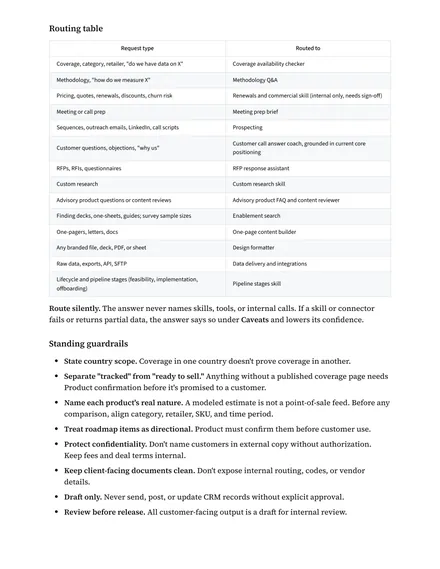
| When someone asks about... | It goes to |
|---|---|
| "Do we have X?" Availability, capabilities, regions, roadmap | Availability checker |
| "How do we measure / calculate X?" | Methodology Q&A |
| Pricing, quotes, renewals, discounts, churn risk | Renewals and commercial (internal only, needs sign-off) |
| Meeting or call prep | Meeting prep brief |
| Sequences, outreach emails, LinkedIn, call scripts | Prospecting sequence builder |
| Objections, customer questions, "why us?" | Customer call answer coach |
| RFPs, RFIs, security questionnaires | RFP response assistant |
| Finding decks, one-sheets, guides | Enablement search |
| One-pagers, letters, customer docs | One-page content builder |
| Exports, APIs, integrations | Data delivery and integrations |
A. Verified answers
- Availability checker: checks master capability lists against the product-truth source. Returns a status table by product line and market, plus roadmap and release history.
- Methodology Q&A: answers only from a fixed set of methodology pages, with an inline citation. If those pages don't cover it, it says so and stops.
- Capabilities fit router: labels a "Can we do X?" as standard, custom, beta, proof of concept, unsupported or a defect, and names the owner.
- Answer calibration: scores source strength, separates fact from inference, and marks an answer ready for internal, customer or leadership use.
B. Customer conversations
- Customer call answer coach: customer-safe answers to objections, grounded in your core positioning doc (this is where Michele's if-then objection vault earns its keep).
- Customer operations response: sanitized external explanations of bugs, delays or data issues, without exposing internal runbooks.
- Internal status comms: internal updates, customer-safe status notes and "don't go dark" check-ins.
C. Deal support
- Meeting prep brief: company, attendees and meeting type in. A five-minute brief out, mapped to your capabilities, 12 months of CRM history and three tailored email hooks. Web research is labeled external.
- Prospecting sequence builder: an 8-step multi-channel sequence with persona mapping, jobs-to-be-done framing, use cases and battlecards.
- RFP response assistant: a fallback ladder: verified-answer skills, then the product-truth source, then the RFP library for framing only. Flags pricing, contract, security and roadmap answers as unverified. Never submits.
- Renewals and commercial: renewal context, churn risk, concessions. Pricing stays internal.
D. Content and brand
- Positioning guardrail: loads first whenever copy is involved, so drafts start on-message, then runs again as the final check on anything external. It checks every draft against your core positioning docs.
- One-page content builder: one-pagers, briefs and FAQs on one branded template, with accessibility built in. Always flagged for review.
- Transcript-to-use-case: pulls evidence from a call transcript, ranks use cases, writes battlecard copy, then runs a PMM positioning review.
- Content reviewer: review only, never writes. One persona scores a red/yellow/green guardrail matrix and pauses. A second validates each finding against the canonical sources.
E. Discovery
- Enablement search: product line, then resource type, then keywords. Searches only approved folders and returns ranked direct links. This one alone kills most "do we have a one-pager?" pings.
Build · Patterns
How do you stop the AI from making things up?
The short versionNarrow sources, a stop rule, and structure. Tell it to stay inside your material, feed it tables and if-then logic, and make it show where every claim came from.
- Give every skill one named source of truth. "Only these five pages" beats "search everything."
- Use fallback ladders, not open search.
- Build in stop rules. "If it's not in the source, say so and stop."
- Push back. Ask where a claim came from. If the Marketing Brain can't point to a source, it shouldn't have said it.
- Split creation from review, with a pause between finding issues and rewriting.
- Layer skill scopes on purpose. Decide whether personal, project or org-level skills win, and retire duplicates.
- Keep skill changes in draft until the owner approves. Treat skills like product copy.
Build · Build order
In what order should you build a Marketing Brain?
The short versionRulebook first, positioning guardrail second, then the answer skills that kill the most interruptions. Deal support and content come after. Connect systems last.
- Write the project instructions (the rulebook above), plus the routing table.
- Build the positioning guardrail skill. Everything that produces copy depends on it.
- Build the highest-volume answer skills. Availability and methodology usually remove the most PMM interruptions.
- Add deal support (meeting prep, prospecting, RFP), each with its own workflow and fallback ladder.
- Add content skills with template, brand and accessibility rules built in.
- Connect the systems: product docs, CRM, wiki, shared drive, chat.
- Schedule refreshes and name an owner for each skill.
// Run it back (on the other side of the mic)
Closing the Hesitation Gap
The Mid-Funnel View · hosted by Shaw Flick
Want the story in my own words? I went on The Mid-Funnel View to talk positioning, trust, and the Marketing Brain I built.
Phase fourShip it
Ship · The pilot
How do you get reps to actually use it?
The short versionDon't launch it to everyone. Pilot it with a few reps who are already sold on AI, on the questions they freeze on most, then let them sell it to the rest of the floor.
Michele's 3x3, in a week
- Three questions. Ask your sales leader for the three questions reps freeze on most. Call transcripts full of long pauses and "let me get back to you" are a gold mine.
- Three sentences. Write a three-sentence answer to each. Concise and specific.
- Load it up. Put those answers and your context into the Marketing Brain.
- Three reps. Give it to your three strongest reps for one week to prep calls and answer their own Slack questions.
Before anyone touches it, pressure-test it yourself with real rep questions. Check four things: every answer cites a source, the stop rule fires when it should, confidence labels show up, and nothing internal leaks into a customer-facing draft.
Then roll it out like rolling thunder
Not all at once. Same playbook April Dunford laid out and the one in the product launch playbook: a series of smaller releases that each build on the last, instead of one big-bang launch day.
Here's how mine went. I started with a few key reps who were already all-in on using AI in their sales cycles. We tested it together over a few weeks. They'd throw real deal questions at it, tell me where it fell flat, and I'd fix the sources and the skills.
That step saved me. The first version was clunky. It brought back impossibly wrong answers. If I'd rolled that version out to the whole team, it would have been a hot mess, and it would have crushed any hope of reps trusting me or the tool again.
Once it was stable, I held open office hours for the whole team. I showed them what it was and how to use it, then walked through a few use cases tied straight back to the questions they asked me most. Lead with their pain, not your build. I had 'em at the first "do we have a one-pager?" demo. (Maybe I should be in sales? Nope.)
You only get one first impression with reps. Burn it with a confidently wrong answer and they're back in your DMs for good. Let your early adopters break it first, then let them be the ones who tell the rest of the floor it's worth using.
Phase fiveKeep it alive
Keep it alive · The feedback loop
How do you keep a Marketing Brain from going stale?
The short versionFeed it from the field every week. Deal feedback from AEs and AMs, an agent watching competitors, updates triggered by releases, and a log of every question it couldn't answer.
A Marketing Brain that goes stale is just a faster way to get the wrong answer. Reps notice once, and then they stop trusting it.
- Deal feedback, in real time. AEs and AMs flag what the Marketing Brain got wrong or couldn't answer, and those notes go straight into the source docs. This is the 20% people own.
- A weekly competitive intel agent. It gathers competitor moves every week, so competitive answers stay current.
- Release-triggered doc updates (in progress). When a release ships, an agent drafts changes to the affected docs and skills.
- The "unknown" log. Every "unknown from company sources" is a question the field asked that your docs can't answer yet. One log, one owner, reviewed weekly. It's your enablement backlog, written by the field.
I'm also building an agent that drafts outbound copy from the same sources, so prospecting stays on-message by default.
Give every skill an owner and a refresh schedule. If nobody owns it, it's already drifting.
Phase sixWatch the film
Watch the film · Impact
How do you measure a Marketing Brain's impact?
The short versionPick measurables that are realistic, attainable and tied back to your company and department goals. Always. For us, that's time to close, and we're pushing for even a 5% reduction. Fewer pings is great for you, but it's not a metric.
Don't invent a vanity metric for your Marketing Brain. Start with the goals your company and your department already track, and pick the one or two it can realistically move.
- Our north star: time to close. Leadership already watches it, so nobody needs convincing that it matters. The 5% isn't a headline number. It's a realistic one, in a language leadership already speaks.
- Reach (context, not the goal): a Marketing Brain for each of 2 product lines, used by 40+ commercial teammates for deal and renewal questions.
- Fewer pings (for you, not the dashboard): five Slack messages to five people became one prompt, and I stopped answering "do we have a one-pager?" 15 times a day. A real win for your mental stability.
The side effect I didn't plan for: I became the go-to AI person in the building. When you're the one who made the team faster, people bring you the next problem too.
Which is why measurement and the roadmap live together. The number tells you whether it's working. The roadmap decides what it does next.
Watch the film · The roadmap
Why does a Marketing Brain need a roadmap?
The short versionBecause it's a product, and products need roadmaps. An up-to-date Marketing Brain roadmap is how you decide what to build next, and how you say "no" (or "not yet") to the wild requests without starting a fight.
Once people trust it, the requests start rolling in. Can it build the whole QBR deck? Can it write the pricing proposal and send it? Can it run the competitive war room on autopilot? Some of those are good ideas. Some are wild. All of them land on your desk.
You already know how to handle this. It's the same reason you keep a product roadmap: a visible plan turns "no" into "here's where that fits."
- Keep it simple: now, next and later. What's live, what's being built, what's on the list.
- Prioritize like a PM: how often the request comes up, whether a source of truth exists for it, and how much damage a wrong answer would do.
- Feed it from the field: the unknown log and deal feedback are your best inputs.
- Make it visible: keep it where people use the Marketing Brain, and point to it every time a new request shows up.
- Update it on a schedule: a stale roadmap is just as useless as a stale Marketing Brain.
- Tie every item to the goal: if it won't help move your north-star metric, it waits. That's your cleanest way to say no.
Steal this
The Marketing Brain checklist
Paste it into your project tracker. Check things off as you go; this page remembers.
01 · Diagnose it
02 · Stock it
03 · Build it
04 · Ship it
05 · Keep it alive
06 · Watch the film
The shortcut
Steal the blueprint. Stop being the human search bar.
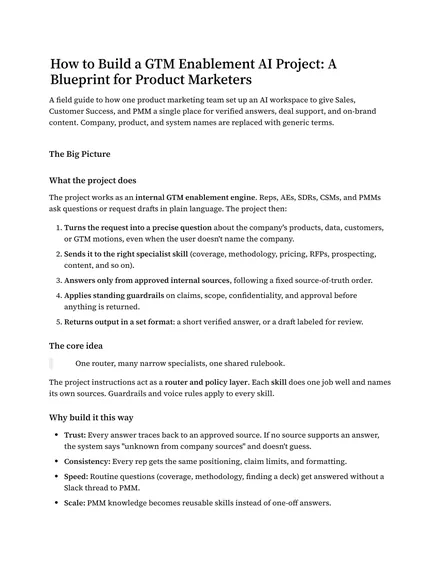
This is the exact blueprint behind my Marketing Brain, on eight pages: the rulebook, the routing table, every skill and the order to build them in. I figured it out the slow way so you don't have to. Copy the structure this afternoon, and save your brain power for the docs your reps actually need.
Ungated. Finance will thank you for every AI credit you don’t burn on trial and error.
Last call
Marketing Brain FAQ
How is a Marketing Brain different from a sales enablement platform?
An enablement platform stores content and hopes people find it. A Marketing Brain answers the question: it reads your approved sources, picks the right one, and tells you when it doesn't know. If you already have a platform, make it one of the sources. And unless you've got an enterprise budget to burn, an AI platform is the only realistic way to build one.
Which AI tool should I use for a Marketing Brain?
Any platform with a shared team Project (or Space) feature: shared instructions, shared files, and access for the whole commercial team. I built mine in Perplexity. Michele uses NotebookLM and custom GPTs. The rulebook and skills matter more than the tool.
How long does it take to build a Marketing Brain?
You can pilot in a week with Michele's 3x3. Stocking my Marketing Brain with real content took about seven months, most of it built from scratch. Don't wait for the full version to start.
What if our docs don't exist yet?
Write those first. The AI can only be as good as what it reads. Start with the source of truth behind your most-asked question family, and let the "unknown" log tell you what to write next.
How do I get reps to trust the answers?
Make every answer show its source, the date it was checked and a confidence level. Make it say "unknown" instead of guessing. One confidently wrong answer costs more trust than ten honest unknowns.
How do I prove a Marketing Brain is working?
Tie it to a goal your company and department already track, and set a target you can actually hit. Ours is time to close, and we're pushing for even a 5% reduction. Reach and fewer pings are nice to see, but they're context, not proof.
Will a Marketing Brain replace sales enablement?
No. AI does the repetitive 80%. People still own the last 20%: positioning, judgment calls, approvals and the feedback loop with the field. And as Michele says, nothing beats bringing a real customer onto your next enablement call.
Monthly newsletter
Built for solo PMMs. But nobody's checking ID.
Alley-Oop takes one big problem off your plate the first Monday of every month, with resources like this playbook and how other PMMs already solved it. Not a solo PMM? Come hang anyway.
One email a month. Unsubscribe anytime. Free, like good advice from a friend.
Keep listening
The episodes behind the build
Three conversations shaped this build. The two from Product Marketing for You have full show notes and links.
- From Static to Dynamic: How to Turn AI Into Your Sales Enablement Cheat Code with Michele Nieberding. She also built a free AI for PMM Sales Enablement Resource Tool to go with it.
- Your Next Product Launch Could Use a Little Rolling Thunder with April Dunford
- Closing the Hesitation Gap on The Mid-Funnel View, with me as the guest
Running a launch alongside this? The Product Launch Playbook for 2027 covers the rest of the court.